网站栏 Site Column
作者:柒月
什么是网站栏
网站栏是构成SharePoint数据最基本的元素之一,可以将它看做一类可重用的列定义,我们可以在内容类型和列表中添加网站栏(网站内容类型/列表设置->从现有网站栏添加)。
举个栗子
我们首先创建一个网站栏叫做备注,指定MaxLength为100。随后,我们创建很多SPList,并添加备注栏,那么,添加的这些网站栏都具有同一个属性——MaxLength为100。随着时间推移,也许MaxLength=100不能满足现有的业务需求,那我们只需修改此网站栏的属性。将MaxLength重新设置为120,保存后,所有引用这个网站栏的列表或内容类型MaxLength都将变为120。
作用范围
在网站上创建一个网站栏时,该网站栏也将对其所有子网站可用,也就是说,子网站的列表和内容类型也可以引用这个网站栏。
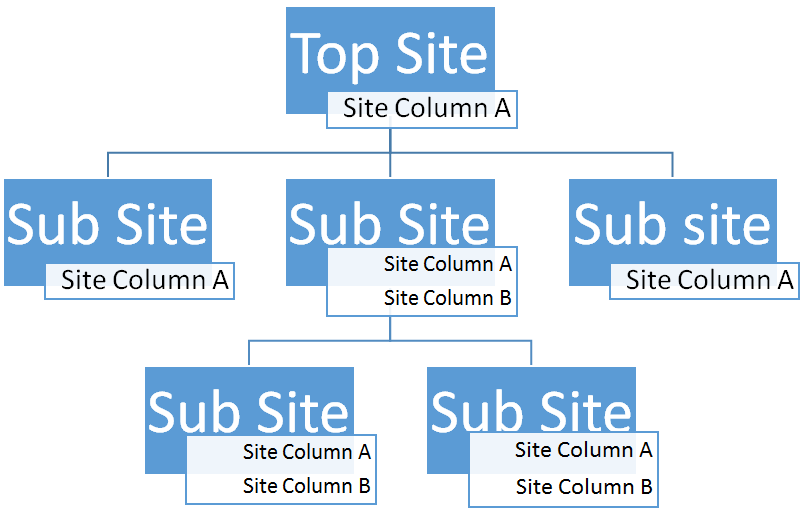
网站栏的属性
- 名称,网站栏的
Name属性在其作用范围之内必须是唯一的 - 数据类型,如:单行文本,多行文本,查阅项,数字,日期 等
- 组,将网站栏进行分类管理
- 其他设置,如:栏验证,默认值 等
如何创建网站栏
SharePoint用户界面 网站设置->网站栏->创建
对象模型 例:
RunWithElevatedPrivileges(delegate()
            {
                using (SPSite site = new SPSite(SPContext.Current.Site.Url))
                {
                    SPWeb web = site.RootWeb;
                    //Create Site Column
                    string SiteColumnName = "India";
                    //Add choice Field "India"
                    if (!web.Fields.ContainsField(SiteColumnName))
                    {
                        string countryField = web.Fields.Add(SiteColumnName, SPFieldType.Choice, false);
                        //Set the Field Properties
                        SPFieldChoice CityInIndia = (SPFieldChoice)web.Fields.GetField(SiteColumnName);
                        //Set the group for the Site column
                        CityInIndia.Group = "States";
                        //Add the choices
                        string[] States = new string[] { "TamilNadu", "Kerala", "Andhra Pradesh", "karnataka"};
                        CityInIndia.Choices.AddRange(States);
                        //Set the default value
                        CityInIndia.DefaultValue = "TamilNadu";
                        //Set Fillable value
                        CityInIndia.FillInChoice = true;
                        //Update the field
                        CityInIndia.Update();

                    }
                }
            });
- See more at: http://www.sharepointpals.com/post/Create-a-Site-Column-in-SharePoint-2010#sthash.rMRlH8jo.dpuf
- PowerShell 例:
```
$site = Get-SPSite -Identity "http://sfs03-pc:12121/sites/Samples/"
$web = $site.RootWeb
$fieldXML = '
' $web.Fields.AddFieldAsXml($fieldXML) $web.Dispose() $site.Dispose() - See more at: http://www.sharepointpals.com/post/Create-a-Site-Column-in-SharePoint-2010#sthash.rMRlH8jo.dpuf ```
- Visual Studio中定义(XML) SharePoint项目(VS2013)->添加->新建项->网站栏 编辑Elements.xml 例:
<?xml version="1.0" encoding="utf-8"?>
<Elements xmlns="http://schemas.microsoft.com/sharepoint/">
<!--SYS_LookupTypes_ContentType Columns Start-->
<Field ID="{A0D69522-274A-458C-BB21-5DD4DEC5B037}" Name="APP_CODE" DisplayName="APP_CODE" Type="Text" Required="FALSE" Group="SYS_Columns">
</Field>
<Field ID="{D1C38307-8BD3-4E75-92B5-AB42B65780D6}" Name="SYSCODE_FLAG" DisplayName="SYSCODE_FLAG" Type="Boolean" Required="FALSE" Group="SYS_Columns">
</Field>
<Field ID="{A3A63C98-AFE0-4B84-A62A-C83FCDD4AA48}" Name="LOOKUP_CODE" DisplayName="LOOKUP_CODE" Type="Text" Required="FALSE" Group="SYS_Columns">
</Field>
<Field ID="{6C887616-7FF0-43C2-903A-837069EFC393}" Name="LOOKUP_NAME" DisplayName="LOOKUP_NAME" Type="Text" Required="FALSE" Group="SYS_Columns">
</Field>
<Field ID="{CD63EA9E-B1BB-4061-8804-452D4B33557A}" Name="REMARK" DisplayName="REMARK" Type="Note" Required="FALSE" Group="SYS_Columns">
</Field>
<Field ID="{25C32A16-8B01-42F0-8A91-DF0A8A0AB4B5}" Name="ENABLE" DisplayName="ENABLE" Type="Boolean" Required="FALSE" Group="SYS_Columns">
</Field>
<!--SYS_LookupTypes_ContentType Columns Start-->
</Elements>